| Question |
Answer |
|
How do I check for Vendor Verification Searches such as
Unemployment and Worker’s Compensation? |
Type
VCUST in the Jump to box
in wvOASIS.
Insert the Vendor/Customer’s Legal Name in the search area.
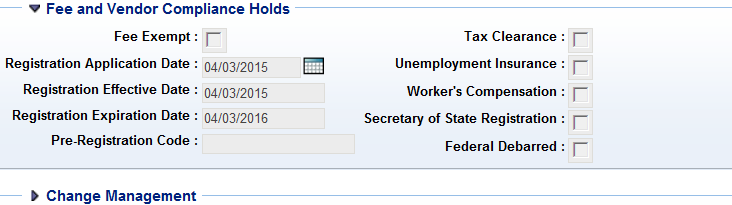
In the Navigation area click on the Fee and
Vendor Compliance Holds.
The wvOASIS system will display the verification
status, with the exception of the WVSOS compliance.
You may search for the Secretary of State
Registration at the link below.
http://apps.sos.wv.gov/business/corporations/
|
|
How do find the Vendor’s
Registration Status?
|
Type VCUST in the "Jump to:" box in wvOASIS. Insert the Vendor’s Legal name in the search area
and locate the Headquarters-designated account for that
entity's current active tax identification number. Click
on the Disbursement Options component of the Navigation area in
the VCUST record to see the "Prevent New Orders" status.
The vendor is in compliance with the Purchasing Division
if the Prevent New Orders hold is set to "Not Active." |
|
What should I do if a vendor has alternate terms and
conditions? |
You should require the vendor to sign the WV-96. |
|
What is the spending limit for an Agency Delegated
Purchase? |
In accordance with the West Virginia Code
and West Virginia Code of
State Rules, state agencies may make purchases in
the amount of $50,000.00 or less of certain commodities
and services. Any spending threshold increase to
$100,000.00 must be approved by the Purchasing Director. |
|
What do you mean by aggregated totals? |
The total amount spent with a specific vendor during a
12-month period. |
|
How do I know if an item I need to purchase is on an
existing mandatory use contract? |
To determine if an item is on an existing contract, go
to the Statewide Contract website located,
http://www.state.wv.us/admin/purchase/swc. The agency should review the specifications for the
appropriate contract. If you have questions concerning
the contracts, contact the buyer directly.
If you determine that the contract items do not meet
your agency’s needs, you will need to obtain a waiver
from the buyer. If a waiver is obtained, be sure to keep
a copy of this document in your file as well as your
research documentation. |
|
When is a wvOASIS award document required? |
A wvOASIS procurement award document is
required for purchases
exceeding $5,000.00 regardless of payment method.
(Reference Section 5.1.2 of the Purchasing Division
Procedures Handbook.) |
|
When is a Certification of Non-Conflict required? |
The Certification of Non-Conflict of Interest is
required for any single purchase exceeding $5,000. For
additional details refer to
Section 3.7.4 of the Purchasing Division
Procedures Handbook. |
|
When is an Asset Tag required? |
An asset tag is required for all equipment that is
valued at $1,000 or more and has a useful life greater
than one year. However, all computers and peripherals
with an acquisition cost of $500 also require an asset
tag. All firearms regardless of cost require an asset
tag. |
|
Do I have to keep my backup documentation? |
The Purchasing Division recommends that the agency
maintain a copy file with all the documentation
associated with the procurement. |
|
What are the requirements for Non-Competitive/Exempt
purchases? |
Vendor registration and all other requirements for the
dollar amounts of the purchase are mandatory for these
contracts; however, the annual vendor registration fee
is waived. |
|
What is the justification for an emergency purchase? |
In accordance with West Virginia Code
5A-3-15, purchases may be necessary when unforeseen
causes arise; however, emergency purchases are not used
for hardship resulting from neglect, poor planning, or
lack of organization by the spending unit. For
additional details refer to
Section 3.7.1.4 of the Purchasing Division
Procedures Handbook. |